Back to FOBO Home
Complete Toolkit Directory

The FOBO Trading Suite

Four specialized browser companion tools built specifically for fomo.family traders. Every tool runs 100% in browser with one click from your bookmarks bar. No browser extensions, no hotkeys, no setup friction.

Main Toolkitv2.4
Toolkit

FOBO Toolkit

Custom Backgrounds, Real Time Greed Index, and Whale Flow Engine

Custom Live Backgrounds
Fear and Greed Sentiment Engine
Whale and Copy Flow Alerts
Corner Dock Minimization
1 Click BookmarkletDrag or Copy

Drag to your Bookmarks Bar, then click it on any fomo.family page.

Note: If you have 2FA enabled on fomo.family, approve permissions with your 6-digit code to add the overlay.

Gas & Slippagev1.8
Optimization

FOBO Fee Saver

Multi Chain Priority Gas Optimizer and Slippage Guard

Dynamic Priority Fee Tiers
Cross Chain Gas Tracking
Slippage Guard Engine
Live Savings Ledger
1 Click BookmarkletDrag or Copy

Drag to your Bookmarks Bar, then click it on any fomo.family page.

Note: If you have 2FA enabled on fomo.family, approve permissions with your 6-digit code to add the overlay.

Strategy & Riskv3.0
Intelligence

FOBO Playbook

Tactical Trading Playbooks, Alpha Verification, and Sizing Rules

Copy Trading Rulebook
Alpha Vetting Matrix
Dynamic Search and Filter
Position Risk Calculator
1 Click BookmarkletDrag or Copy

Drag to your Bookmarks Bar, then click it on any fomo.family page.

Note: If you have 2FA enabled on fomo.family, approve permissions with your 6-digit code to add the overlay.

Speed & Sniperv2.0
Execution

FOBO Bolt

Ultra Fast Execution HUD, Quick Size Presets, and Sniper Triggers

Quick Position Presets
Turbo Slippage Toggles
Latency Tracker
Stealth Floating HUD
1 Click BookmarkletDrag or Copy

Drag to your Bookmarks Bar, then click it on any fomo.family page.

Note: If you have 2FA enabled on fomo.family, approve permissions with your 6-digit code to add the overlay.

Important 2FA Notefomo.family security

Two-Factor Authentication (2FA) Notice

If you have 2FA (Two-Factor Authentication) enabled on fomo.family, you will need to approve permissions to add the overlay. When prompted, enter your 6-digit authenticator code to allow the overlay to initialize.
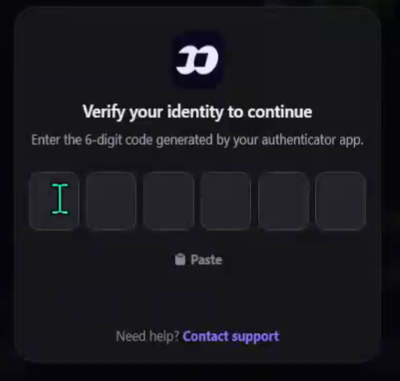
fomo 2FA authentication verification dialog
Why you might see this prompt:

fomo.family prompts for identity verification before permitting injected overlay actions if two-factor authentication is active on your profile.

  • Open your authenticator app (e.g. Google Authenticator, Authy).
  • Enter or paste the 6-digit verification code.
  • Once approved, the FOBO tool overlay will load and run smoothly.

How the Suite Works

Zero Configuration

Each tool is a self contained bookmarklet. Save any of them to your bookmarks bar and tap it on fomo.family to activate.

100% Client Side

No wallets to connect and no account creation. The tools run directly in the memory of your current tab and clean up cleanly on page reload.

Stackable Overlays

You can use the FOBO Toolkit custom look together with Fee Saver, Playbook, or Bolt side by side without conflicts.