Read the room.
Fear, greed, and the bigger picture. Dynamic volume, volume ratios, and live buy side flow shifts.
The bookmarklet that makes fomo.family feel like yours. 25 custom backgrounds, live fear and greed analytics, whale radar, and a compact corner docking HUD.

A CHANGE OF SCENERY
Find your focus. Set the mood.
Give fomo a background that feels like you.
Or use your own image or color inside the bookmarklet.
LOOKS GOOD. WORKS HARDER.
One floating panel.
Only the tools you turn on.
Fear, greed, and the bigger picture. Dynamic volume, volume ratios, and live buy side flow shifts.
Set your threshold. Keep an eye on the high conviction trades that deserve your attention with audio chimes.
Follow wallets, add custom labels, and get notified instantly when target wallets transact.
Your chosen accounts in one focused place without switching tabs or losing chart focus.
FOBO is the overarching brand for our trading power tools. While the main FOBO Toolkit gives you custom looks, live Fear & Greed, and wallet alerts, each specialized tool below runs directly in your browser with zero extensions or hotkey setup.
If you have 2FA (Two-Factor Authentication) enabled on fomo.family, you will need to approve permissions to add the overlay. When prompted, enter your 6-digit authenticator code to allow the overlay to initialize.
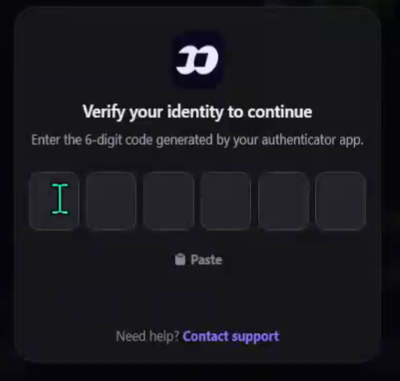
fomo.family prompts for identity verification before permitting injected overlay actions if two-factor authentication is active on your profile.
Zero wallet private key requests, zero background permissions, and zero tracking. Pure client side DOM injection.
Works in Chrome, Brave, Safari, Edge, and Firefox. Drag any bookmarklet to your bookmarks bar and tap it to launch.
Run the FOBO Toolkit look customizer alone or stack Fee Saver, Playbook, and Bolt side by side on fomo.family.
LESS SETUP. MORE YOU.
Windows: Ctrl + Shift + B. Mac: Command + Shift + B. In Chrome, Brave, or Firefox, this reveals the bar right below the address bar.
Click and hold the FOBO button above or any tool in the suite. Drag it up to your browser's bookmarks bar, then release. You now have a 1 click trading tool.
Open fomo.family and let it load. Click the saved bookmark in your bar. The overlay launches instantly directly in the tab.
More of a copy and paste person?
GOOD QUESTIONS.
Working tools. No mysteries.
A bookmark with clean, self contained JavaScript inside. Save FOBO or any tool to your browser bookmarks bar, open fomo.family, and click it. It loads your custom background and toolkit instantly. Nothing to install from an extension store.
Yes. FOBO changes the actual page background, not just the toolkit panel. Choose a scene, gradient, texture, custom color, or your own image. You can adjust the dimming and restore the original look at any time.
FOBO is the umbrella brand. In addition to the FOBO Background and Toolkit, the suite includes FOBO Fee Saver (multi chain gas and priority fee optimizer), FOBO Playbook (tactical trading rules and alpha vetting), and FOBO Bolt (instant execution and quick position sizes).
No. None of the FOBO tools ask for wallet access, seed phrases, private keys, or signing permissions. All features run locally in memory via clean DOM inspection.
Works on desktop Chromium browsers (Chrome, Brave, Edge, Arc, Opera) and Firefox. Simply drag the bookmarklet button to your bookmarks bar, then click it on fomo.family.
Refresh simply removes the overlay from memory. Click your bookmark again anytime to reapply. The close button removes FOBO and restores the default site background cleanly.
If you have Two-Factor Authentication (2FA) configured on fomo.family, you will need to approve permissions to add the overlay by typing in your 6-digit code from your authenticator app.
YOUR NEXT FAVORITE TRADING SIDEKICK